
Memory map
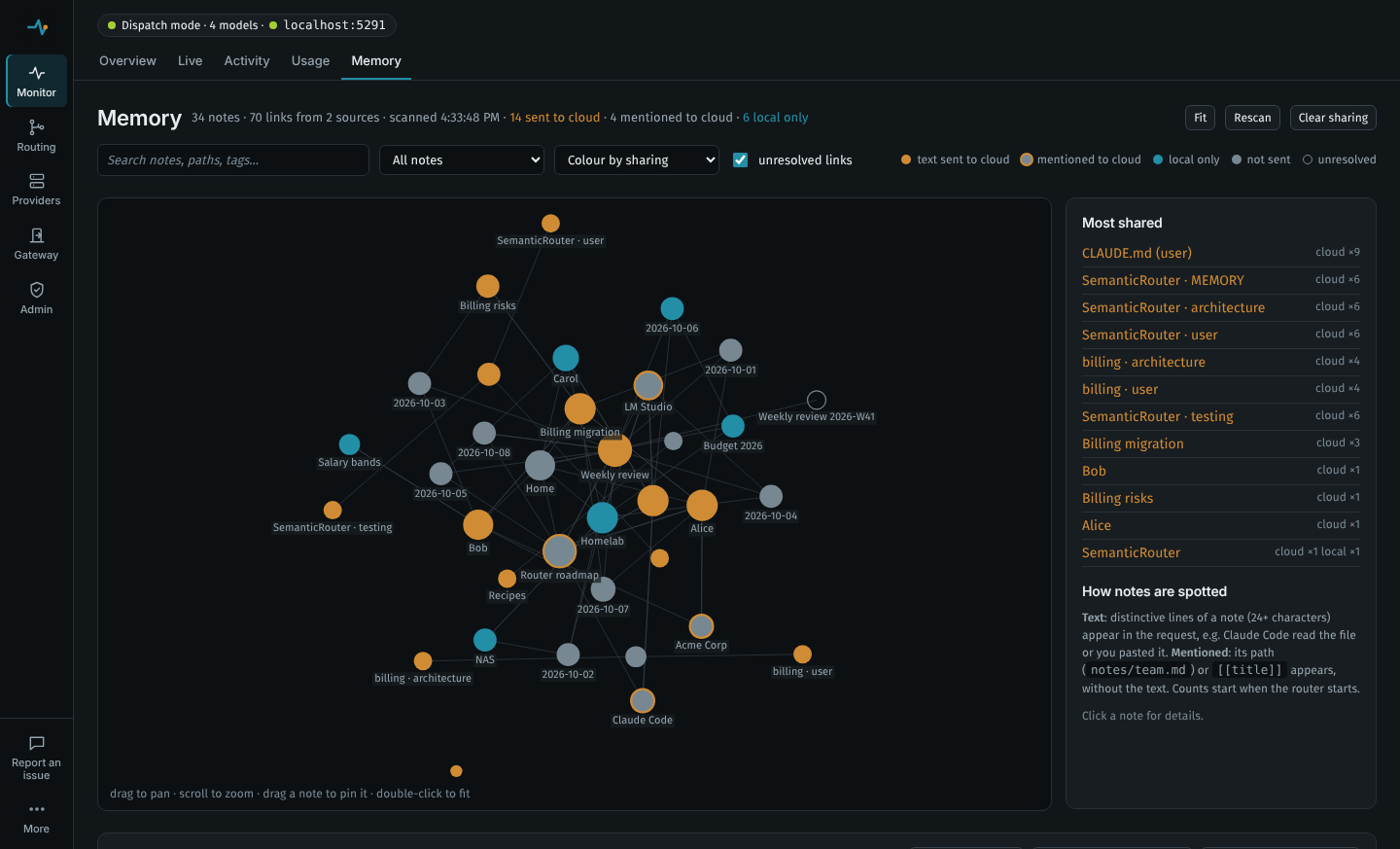
The router can read the notes you and your AI tools keep (an Obsidian vault, Claude Code's own memory, the MCP memory server's knowledge graph) and show two things in the dashboard:
- The map: every note as a node and every link as an edge, like Obsidian's graph view, on the Memory page.
- What you share: for every routed request, which of those notes were in it and which model received them, local or cloud. Notes light up on the map as they are sent, the Live page lists them per request, and the Activity page marks requests that carried notes.
That answers the question a router like this raises: when Claude Code reads your memory files, or a chat tool injects "things it remembers about you", does that text stay on your machine or go to a cloud model?
Set it up
Add sources under SemanticRouter:Memory in the configuration file. The Memory page's Add Claude Code adds Claude Code's memory in its default place; a path you type there (with Add folder or Add MCP graph, or a changed one) is refused over the dashboard unless Dashboard:AllowProcessSettings is on (see Privacy):
"SemanticRouter": {
  "Memory": {
    "Sources": [
      // An Obsidian vault: the folder that contains .obsidian.
      { "Name": "vault", "Type": "Markdown", "Path": "C:\\Users\\you\\Documents\\Obsidian Vault", "Exclude": [ "Templates/*" ] },
      // Claude Code's own memory: ~/.claude/CLAUDE.md and every project's auto-memory folder.
      { "Name": "claude-code", "Type": "ClaudeCode" },
      // The MCP memory server's knowledge graph (its MEMORY_FILE_PATH).
      { "Name": "mcp-memory", "Type": "KnowledgeGraph", "Path": "~/.mcp/memory.jsonl" }
    ]
  }
}
Or in code:
builder.Services
    .AddSemanticPromptRouting(builder.Configuration.GetSection("SemanticRouter"))
    .AddMemorySource("vault", MemorySourceType.Markdown, @"C:\Users\you\Documents\Obsidian Vault")
    .AddMemorySource("claude-code", MemorySourceType.ClaudeCode);
Paths expand ~ and %VARIABLES%. Sources are scanned in the background at start-up, when the configuration changes, on Rescan, and again once RefreshInterval (default 1 minute) has passed and a request arrives. Sharing is recorded in Dispatch mode, where the router knows which models it sent a request to; in Annotate mode the map and the per-request notes still work, but not the counts.
Supported sources
Type | Reads | Notes |
|---|---|---|
Markdown | A folder of notes, recursively | Obsidian vaults, Logseq, Foam, Dendron, any folder of .md files. [[wikilinks]] (with |label, #heading, ^block and ![[embeds]]), Markdown links to .md files, frontmatter title, aliases and tags, and inline #tags are understood; code blocks are ignored. Folders whose name starts with a dot (.obsidian, .git, .trash) are skipped. Exclude takes * globs on the relative path. Extensions adds file types: [".md", ".txt"] for a folder written by the Claude API's memory tool, for example. |
ClaudeCode | ~/.claude (or Path) | Claude Code's user memory (CLAUDE.md, CLAUDE.local.md) and every project's auto-memory folder, projects/{project}/memory/*.md, whose MEMORY.md index links its topic files. Notes are titled by project (SemanticRouter · architecture) unless their frontmatter has a name. Agents, commands, settings and session transcripts are not read. A repository's own CLAUDE.md files are project files: add the repository as a Markdown source to map them. |
KnowledgeGraph | The JSONL file of @modelcontextprotocol/server-memory | The memory server Claude Desktop and Claude Code are often given. Each entity becomes a note in a folder named after its entity type (also its tag), its observations become the note's lines, and relations become links. A path to a folder looks for memory.jsonl (or memory.json) in it. Set the server's MEMORY_FILE_PATH so you know where the file is. |
| your own | anything | Implement IMemorySource (a name, a kind, a location, and LoadAsync returning MemoryDocuments with a path, text, and optional title, tags and links) and register it with .AddMemorySource<T>() or .AddMemorySource(instance): a database of saved facts, a vector store's documents, another MCP server. |
Memory kept by claude.ai and the Claude apps for your account lives with Anthropic, not in a file on your machine, so it cannot be mapped. The MCP memory server is the local equivalent.
How notes are spotted in a request
Every string in the request body is scanned (system prompt, messages, tool calls and tool results), so it works the same for every protocol and whatever a client injects.
- Text. Each note is fingerprinted line by line: lines of at least
MinimumLineLengthcharacters (default 24), with whitespace collapsed. Lines that appear in more than three notes (template boilerplate, footers) are dropped as not distinctive. A request line that matches a fingerprint counts as that note's text being sent; the dashboard shows how many of its distinctive lines were present (2/3 lines). The line-number prefixes that file-reading tools add (Claude Code's Read returns12→text) are ignored, so a file Claude Code read is recognised. - Mentioned. A note's path or file name (
projects/Billing.md,Billing.mdwhen only one note has that name) or its[[title]]/[[alias]]in the request counts as a mention: the model saw the note's name, not its text.
Limits worth knowing:
- Matching is per whole line. A sentence from a note quoted in the middle of a longer line is not recognised; a note pasted, read by a tool, or injected as a block is.
- Notes whose lines are all shorter than
MinimumLineLength(one-word lists, very short observations) can only be detected by mention. The note's details say so. - Paraphrases are not detected: a model that summarised your note in an earlier turn and is now sent that summary does not count.
- Counts are kept in memory and start at zero when the router starts, even with
UseSqliteState(the activity entries, with the notes each request carried, do persist there). Clear sharing resets them.
Privacy
- Note text never leaves the router. The dashboard and its API get titles, paths, folders, tags, aliases, links and sizes; activity entries get the titles and ids of the notes a request carried.
- Scanning reads files on the machine the router runs on, with the router's permissions. Which folders and files are read is changed in the configuration file: the admin API refuses a source with a new path unless
Dashboard:AllowProcessSettingsis on, since loopback clients are admin without a token. Only an admin can rescan; the read-only token can see the map, which includes note titles and paths. - Fingerprints are 64-bit hashes held in memory, used only for matching.
Configuration
| Key | Default | |
|---|---|---|
Memory:Sources[] | none | { Name, Type, Path, Exclude[], Extensions[], Enabled }. Type is Markdown (default), ClaudeCode or KnowledgeGraph. Path is required except for ClaudeCode (default ~/.claude). |
Memory:TrackSharing | true | Check routed requests for notes. Off: the map is still drawn, requests are not scanned. |
Memory:MinimumLineLength | 24 | Shortest line (characters, whitespace collapsed) used as a fingerprint. At least 8. |
Memory:RefreshInterval | 00:01:00 | How old a scan may get before the next request starts a background rescan. |
Memory:MaxNotesPerSource | 5000 | Notes read per source; the rest are counted as skipped. |
Memory:MaxNoteBytes | 1048576 | Files larger than this are not read. |
API
All under the dashboard prefix, see Admin API.
| Method and path | Purpose |
|---|---|
GET api/memory | { loadedAt, sources[], nodes[], links[[from, to]], exposure{ noteId: { localContent, localReference, cloudContent, cloudReference, firstShared, lastShared, models{} } } }. Scans first if nothing has been scanned yet. |
POST api/memory/refresh | Rescan every source now and return the map (admin). |
POST api/memory/exposure/reset | Forget the sharing counts (admin). |
GET api/events | Server-sent events: an activity event when a request is routed and again when it finishes, with its memory notes and sentTo models. |