
The dashboard
A single-page app, embedded in SemanticRouter.AspNetCore, that shows what the router is doing and lets you change every setting with hot reload. No build step, no extra package.
app.MapRouterDashboard("/router"); // UI at /router, admin API under /router/apibuilder.Services
.AddSemanticPromptRouting(builder.Configuration.GetSection("SemanticRouter"))
.UseConfigurationFile("semantic-router.json"); // optional: make dashboard changes survive restartsPages
The rail on the left has five sections, and the current section's pages are tabs under the top bar. A section opens on the tab last open in it. Every page keeps its own address (#/learned, #/connectors), so links from the tray, notices, webhooks and bookmarks go straight to the right tab. Report an issue (the Feedback page) and More (the router's version, the theme picker and Sign out) sit at the foot of the rail. In the desktop app's window, More also has About SemanticRouter, and a banner under the tabs offers an app update when there is one.
| Section | Tabs |
|---|---|
| Monitor | Overview, Live, Activity, Usage, Memory |
| Routing | Tiers, Routes, Rules, Profiles, Evaluate, Router learned |
| Providers | Models, Connectors, Embeddings |
| Gateway | Settings, Connect clients |
| Admin | Service, JSON, Audit log |
| Page | What it does |
|---|---|
| Overview | Leads with what to act on. While no model is enabled, Set up SemanticRouter: three steps, each with its state: add a connector (tools found on this machine first, such as a signed-in Claude Code, each saying what enabling it means; then presets for LM Studio, Ollama, OpenAI, Anthropic, OpenRouter, Gemini and the CLIs), add models (Discover models from the draft, then Apply & save), and send a test prompt; read-only users see that an admin needs to add a model. Then Needs a decision, This week (one row of counters), every model with its tier and health (ready, cooling down, disabled), recent activity and Try a prompt: classify without calling a model (a leading callout such as @opus applies, shown as a badge), or send it through the gateway for real; a failed Send says why and where to fix it. Below: Service, connector endpoints, trends, what the router learned, served-by and required-tier bars, and About this router (folded: where it runs, the configuration version and whether it is saved, the store, the embeddings index and classification cache, gateway paths) |
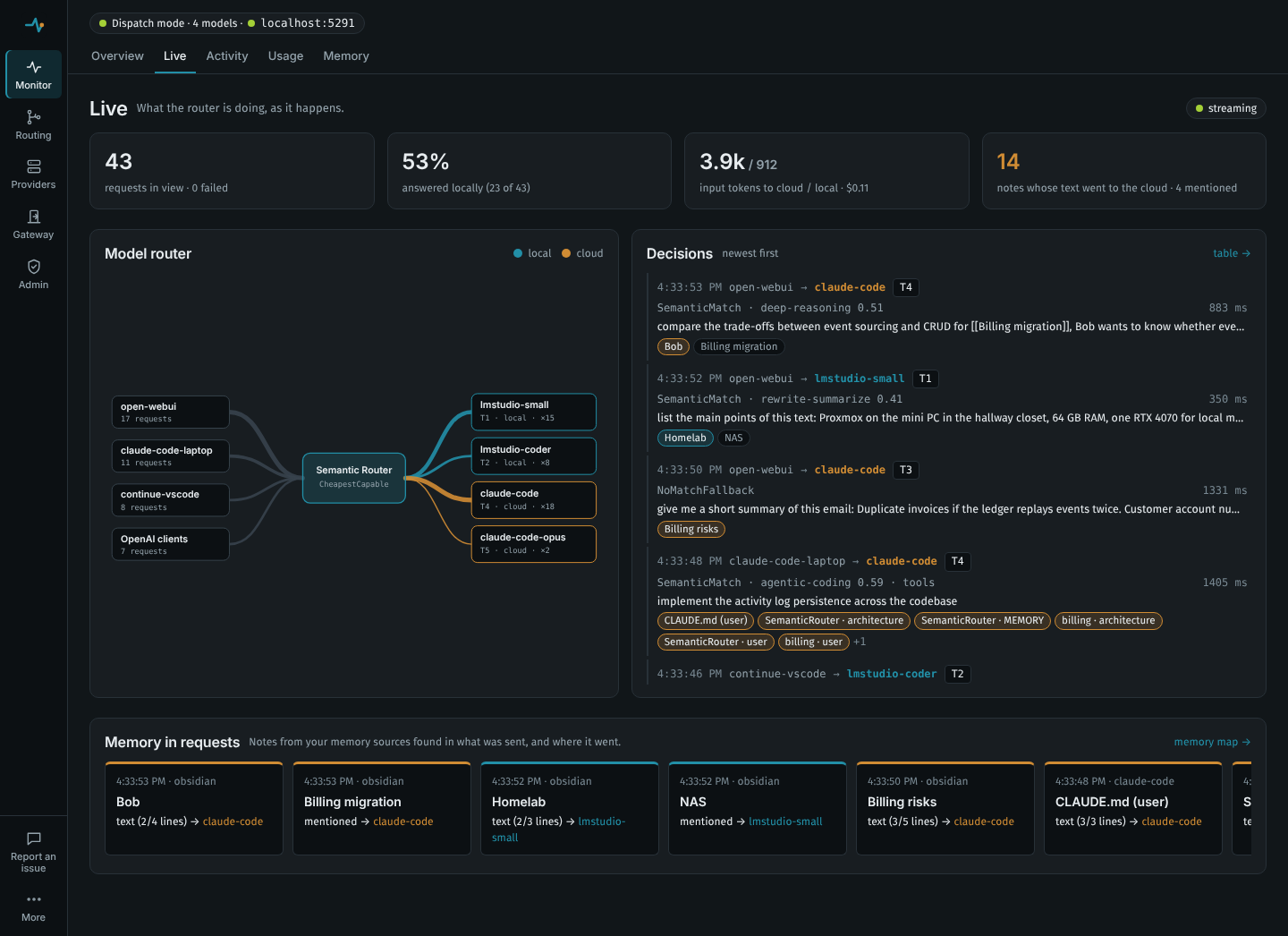
| Live | What is happening now, pushed over server-sent events: tiles for requests, the share answered locally, input tokens (reported by the backend, or estimated) to cloud and local models, and notes whose text went to the cloud; a model router graph from clients (named by gateway key, or by protocol) through the router to every model, with the edge that just carried a request animated; a feed of decisions with the notes each request carried; and a strip of the latest memory crossings. |
| Overview → Service | The router itself. Point clients at: the OpenAI-compatible base URL (…/v1) and the Anthropic base URL for this machine and, when it listens beyond loopback, for other machines (the machine's name and network addresses, then PublicOrigins), each with a Copy button, and whether other machines can use it (only this machine, gateway key required, other machines refused until a key is set, or open to the network). Health: running, starting (embedding the routes), degraded (warm-up failed, or some connectors failing or down) or failing (no enabled model, or every connector in use failing or down), connectors answering, the embeddings index, the last request and the last answered one, and everything that needs a look. About this router (further down, folded) has where it runs: the machine, process id and uptime, the program, version and .NET runtime, the addresses it listens on and the configuration file |
| Overview → Needs a decision | Shown only when something needs you; see Digest and notifications. |
| Overview → This week | The digest of the last 7 days: prompts routed (served, below their tier, failed), the share served locally, cost and savings (with a link to set the reference model), decisions raised a tier, signs a decision fell short, and what the router learned |
| Overview → Connector endpoints | Where each connector sends requests and how it is doing. Host is the address's host and port only (never its path, query or credentials), or for a CLI the program it runs and whom it sends prompts to; local marks one on this machine and unencrypted plain HTTP to another machine. State is ok, degraded (some of its models cooling down, or a quarter or more of recent requests failed), failing (every request since a moment has failed, or the last check failed), down (every model cooling down), idle (nothing sent yet) or unused (no enabled model), with since when, until when and the last error. Over the activity log: the share of requests answered (an attempt that failed and fell through to another model counts against its endpoint), time to the first byte and to the end of a reply (p50/p95, timed from when this endpoint was asked, so a failed attempt before it is not counted), output tokens per second, and when it was last used. Check asks it now without calling a model: reachable and key accepted for HTTP, installed and signed in for a CLI, the runtime starts for Copilot (the checks semantic-router doctor runs). The top bar shows the host the latest request went to, with its state; the Connectors page shows each connector's state. |
| Overview → Trends | Requests per interval and p50/p95 latency over 1 hour, 24 hours, 7 or 30 days, with a table view. |
| Usage | Tokens and cost by model, connector, route, client, profile, local or cloud, or day; "saved by routing" against a reference model; feedback per route and model (one line when there is none); budgets with their state; the usage settings and the budget editor, where each budget covers one model, connector or profile (picked with Covers) and a new one starts valid ($5 a day on the first model) |
| Activity | The last 500 routed requests: time (with the date when not today), prompt preview, protocol, tier, the reason in words (the value, such as NoMatchFallback, in its tooltip), route and similarity (or "no route" with the best score), the model that answered, attempt number, degraded flag, timing. Each entry shows its routing profile, project, the signals that kept it local, what the connector noted (a repaired or malformed tool call) and the time to the first byte under the total. Show filters by failed, degraded, with tools, prompted tool calls or profile; Search finds words in the prompt, route, model or client. A click on a row (or Enter) opens the whole decision. Label (the tag button) says which tier a prompt should have had (none is picked for you): it adds the prompt to the evaluation set and, optionally, as an utterance to a route. Report (the flag) opens the entry on the Report an issue page: a misroute, or a bug for a failed request |
| Router learned | What automatic tuning changed (thresholds, utterances, cheaper models per route) and suggests, why, and its effect since; undo or apply each change, Undo all, Pause learning, Run now, and the models on trial. Settings has the common Tuning options (mode, how often, prompts needed, step size, how long an undone change stays away, model trials, utterances); the rest are on the JSON page. The Reliability card on the Models page shows which models are left out of which work (model reliability) |
| Memory | The memory map: notes from an Obsidian vault, Claude Code's memory or the MCP memory server as a force-directed graph, coloured by where they have been sent (text to the cloud, mentioned to the cloud, local only, not sent) or by source or folder. Search, filter, select a note for its links and per-model counts; notes pulse as requests carry them. The memory sources are edited here too; without any, the page offers the three kinds of source to add |
| Tiers | The capability ladder with names and descriptions, and a matrix of which routes require each tier and which models provide it. Shows at a glance when a tier has nothing that can serve it. |
| Routes | Intent clusters: name, tier, required capabilities (ticked, plus any other tag), threshold, local-only, follows the conversation, utterances |
| Evaluate | Runs the evaluation set through the configuration: accuracy, too-low and too-high counts, accuracy per tier, a confusion matrix, the misrouted prompts with their scores, a threshold sweep with recommended values, route health, and a comparison with another embedding model. With an empty set it says how to add prompts here or label them on Activity. See Tuning routing from evidence |
| Models | The catalog, grouped by connector with each group's tiers at a glance: connector, provider model id (with Discover, which suggests the connector's model ids), tier, capabilities (ticked), context window, costs, priority, active hours, local flag, enabled. Add model needs a connector first. Next to a model's list price, its effective input price once its recent turns show how much it reads from the prompt cache (e.g. "$0.57 input per M with cache (90% cached)"): the price cost estimates and model trials use. GET api/status has it per model as effectiveInputCostPerMillionTokens, with the shares as cacheShare. Discover models on a connector asks it as the draft describes it, so a connector added a moment ago works before Apply, and lists everything it offers (load state, size, context, which models are already in the catalog) with a suggested name, tier and capabilities for each, the likely ones ticked; adjust them, and Add selected puts them in the draft; cloud models come with their list prices from OpenRouter's public price list. Look up prices on a connector's group fills in (or refreshes) the prices of its cloud models in the draft, a subscription's API prices included (Looking prices up). The Reliability card is below the list (folded while every figure is too thin to judge). See Model lineups |
| Connectors | Add connector offers presets (and tools found on this machine) next to a blank connector; an empty page lists them. HTTP (OpenAI-compatible or Anthropic): base address, path, API key, headers, forwarded headers, timeout. CLI: preset, executable, extra arguments, tool calling (with streaming and repair switches), quota patterns, environment, concurrency and queue limit. Copilot: the CLI the SDK runs, its home directory, concurrency, queue limit. Discover models lists what the connector offers, as on the Models page |
| Routing rules (the Rules tab) | Basic: similarity threshold, fallback tier, complexity → tier rules, selection strategy, attempts, cooldowns and answering below the tier. Advanced (folded): ambiguity margin, scoring strategy, complexity short-circuit, reported scores, the time zone for model active hours, the output estimate, and the complexity heuristic weights and keywords. Each has a one-line hint; defaults show as placeholders, and a duration that is not hh:mm:ss is flagged as you type. |
| Profiles | Four cards: Profiles (allowed and denied models and connectors, picked from the catalog with globs beside them, tier floor and cap, strategy, local-only); How a request picks a profile (client mappings and rules, with the profile and project headers under Advanced); Virtual models; and the content signals that keep a conversation local. What would each profile do? routes one prompt under every profile side by side. See Routing profiles |
| Embeddings | Provider (Hashing, Onnx in-process, or an OpenAI-compatible server), model, endpoint, batch size, timeout, warm-up, and a probe that embeds a sentence with the applied provider. For ONNX models it shows the suggested threshold and can apply it. |
| Gateway (the Settings tab) | Mode (Dispatch or Annotate), OpenAI, Anthropic and Responses path prefixes, tool-turn pinning and system-reminder stripping; Advanced (folded): message selection, body limit, header prefix, injected tags, response headers, fail-open. Then gateway keys, rate limits, stored prompts (State:StorePrompts, retention), Stored activity (Delete all activity, which acts at once rather than through the save bar), and model aliases (with Add Claude Code defaults). |
| Connect clients | Ready-to-paste snippets for Claude Code, OpenAI SDKs, Codex CLI and curl, filled in with the router's address. |
| Service | Admin only. How the router runs on this machine (the semantic-router tool; an application that hosts the router itself, or the desktop app, says so here and keeps its own controls). This router: how it runs (from a terminal, as the background service, in a container), the machine, process and addresses, with Restart (in the same process, picking up the saved settings; requests in flight finish first) and Stop. Who can connect: This machine only (localhost) or Other machines too (0.0.0.0) and the port, saved to semantic-router.host.json in the configuration directory and applied by Save and restart; while --urls on the command line, an ASPNETCORE_URLS-style variable, Kestrel:Endpoints or a container decides instead, it says which. Serving other machines lists what that needs: gateway keys, a dashboard token, TLS in front, the firewall. A restart onto a port that is taken goes back to the old address and says so. Background service (systemd, launchd or the Windows sign-in entry, as semantic-router service installs): installed or not, its definition and logs, Install and hand over (this router stops and the service's router takes over; if that fails, this one starts again and the page says why), Reinstall and Remove the service. The page waits for the router to come back after each action, and moves to the new port when it changed. |
| JSON | The whole document as text (the same shape as the SemanticRouter section of appsettings.json): edit it and Make this the draft, Reload the draft into the editor, download, compare with the application baseline, reset. History lists every applied version (when, what applied it, who), diffs any of them against the draft and rolls back to it |
| Audit log | Admin only. Every change made through the dashboard or admin API, sign-ins and sign-outs: when, who (the user your proxy signed in, admin token, read-only token, metrics token or this machine), from which address, what, the request and its status. Download JSON Lines exports it; Sign out every session ends every dashboard session (Sessions). See Audit log. |
| Report an issue (Feedback) | Opens a pre-filled issue on GitHub: routed to the wrong tier, something does not work, or an idea. For a request (picked here, or with Report on Activity) it fills in the decision line (reason, tier, route and similarity, complexity, planned and serving model, the request's protocol, client and size, feedback signals), the model that answered, the embedding provider, model and threshold, and the router version; for a bug, the operating system too. It never adds the prompt, the project, memory notes or error details; Use the stored preview adds the prompt preview only when you ask. A local-only prompt answered by a non-local model is pointed to private security reporting instead. Nothing is sent from the router: you read the issue over on GitHub and submit it there. |
Digest and notifications
The router handles what it can on its own and asks for attention only when a person needs to decide something.
The digest (Overview → This week, GET api/digest, and a line in the desktop app's tray menu) covers the last 7 days:
- prompts routed and requests served;
- the share served by local models;
- cost, the savings against
Usage:ReferenceModelwhen it is set, and subscription use at API prices (not spent), all at the catalog's current prices, so a corrected price corrects past usage too; - decisions raised a tier (complexity, an ambiguous match, a retry, the conversation's floor), degraded and failed requests;
- signs a decision fell short (feedback) by kind;
- the changes automatic tuning made, linked to the Router learned page, where each one can be undone.
Its numbers are the Usage page's for the same window.
Notices say what needs a decision. Each is listed under Needs a decision on the Overview, with a link to the page to decide on, and it clears on its own when the condition ends:
| Notice | When |
|---|---|
| A subscription keeps hitting its usage limit | A connector hit its usage limit on Notifications:LimitDays (3) of the last 7 days. |
| A budget keeps running out | A budget was spent in 2 of its last 4 periods (days, weeks or months), the current one included. |
| A model is unreliable for most of its work | Model reliability left it out of more than half of the kinds of work it does (routes, requests with tools). |
| A connector is down | Every request to it has failed for Notifications:ConnectorDownAfter (1 hour). A usage limit does not count. |
| Tuning wants a change it may not make | Automatic tuning has suggestions waiting: Tuning:Mode is Suggest, or a change someone undid came back with stronger evidence. |
| An upgrade kept settings you had changed | An upgrade to a newer built-in template kept settings you had changed that the template changed too (Upgrading and going back). The Overview lists them under New defaults to review: Use the new default or Keep mine for each; the notice clears when all are decided. |
Notifications: when a notice appears, the desktop app shows a system notification and the service writes a warning to its log ("Needs a decision: …"). Each is announced once, and the log says when it clears. Notifications:Enabled: false is the one switch that silences them (and the webhooks below); the Overview still lists the notices.
Webhooks: to hear about notices away from the machine, add webhooks. Each gets a message when a notice appears and when it clears, and the digest of the past week once a week (the first week starts when the webhook is added):
"Notifications": {
  "DashboardUrl": "http://router.lan:5080/router",
  "Webhooks": {
    "phone": { "Url": "https://ntfy.sh/my-router-topic", "Format": "Ntfy" },
    "team":  { "Url": "https://hooks.slack.com/services/T000/B000/XXXX", "Format": "Slack", "Digest": false },
    "ops":   { "Url": "https://example.com/hooks/router", "Notices": false }
  }
}| Format | What is POSTed |
|---|---|
Json (default) | {"type":"notice","state":"appeared"|"cleared","key","kind","title","detail","link","since"}, or {"type":"digest","summary","digest"} with the same figures as GET api/digest. |
Slack | {"text": …}, which Slack incoming webhooks, Mattermost and Discord's /slack endpoint accept. |
Ntfy | The text as a plain body, with Title, Tags, Priority and (with a DashboardUrl) Click headers, for an ntfy topic URL. |
Webhook messages leave out text that can come from prompts or replies: a learned utterance reads as "utterance for code", and a connector's latest error (which for a CLI connector can quote the model's reply) is dropped. They keep the counts, model, connector and route names, kinds and links. Notifications:IncludeDetails: true puts the text back, for a webhook you trust with prompts.
Notices and Digest (both true) choose what a webhook gets. DashboardUrl turns the notice's page into a link people can open. A webhook URL usually carries a token, so it is treated as a secret: masked on the dashboard and moved to the secret file with .UseSecretFile(), like an API key, and it can be a ${secret:…} or ${env:…} reference. A delivery that fails is retried three times (after 2, 10 and 60 seconds) and then logged as a warning; it runs in the background and never holds up routing.
Connector failures and usage-limit hits are kept in the state database when there is one (UseSqliteState, as the semantic-router tool and the desktop app use), so they add up across restarts. Without it they are counted in memory, and a restart starts the count again.
Apply, save, revert
Editing never touches the running router until you choose. The top bar counts the draft's changes (Review shows them next to the running configuration) and offers:
- Validate runs the same checks the router runs on start-up and lists problems.
- Apply & save builds a new runtime from the draft, swaps it in atomically and writes the document to the configuration store, when one is registered. In-flight requests finish on the old runtime; new ones use the new one. Model cooldowns are kept.
- Apply only applies without saving: a restart undoes it. The top bar then says Running configuration not saved, with Save (write the running configuration to the store as it is) and Revert to saved (go back to what the store holds). The More panel shows the source as not saved.
- Discard drops the draft, after asking; Undo in the message brings it back.
Problems are shown next to their fields: the field is marked, its item opens, and the first one gets the focus. The Configuration problems list at the top links each problem to its field, on whichever page it lives. A "Not applied" message stays until you close it.
The draft is not lost.
- Apply names the version the draft started from, and the router process that ran it (the version counter starts again after a restart). When someone else applied a configuration meanwhile (another tab, the CLI, a learned change) or the router restarted, the dashboard says who and when, and offers Reload (drop your changes), Compare (the two side by side) or Apply mine anyway. The refresh notices such a change too: a draft without changes is reloaded quietly, and unapplied changes are moved onto the new configuration as below.
- Adding an utterance from Evaluate or Activity, applying or undoing a learned change, Save or Revert, and a change the refresh notices move your unapplied changes onto the new configuration when they touch other settings; otherwise the draft stays as it was and the notice above appears. Lists that are sets (utterances, capabilities, a profile's allowed and denied models, exclusions) combine what both sides added; routes, models and memory sources combine by name. A list whose order counts (CLI arguments, the order of routes or models, model aliases, where the first matching pattern wins) changed on both sides is a conflict. A rollback says that it replaces the draft.
- Signing in again after a session ends keeps the draft. Text typed in the JSON editor or the evaluation set is kept across pages, and the browser asks before you leave with any of it unapplied.
- Removing a route, model, connector, profile, tier, budget or memory source shows Undo. A connector that models use, or a profile that rules, virtual models, client mappings or budgets name, asks whether to remove those too.
- Model aliases and rate limits are edited as rows: two rows with the same name are flagged rather than merged, and the arrows order the aliases (the first matching glob wins). Add Claude Code defaults adds the names that are missing and leaves the targets you set.
Adding an utterance or a learned change saves the configuration as before, unless the running configuration has unsaved changes: then it is applied without saving, and the message says "applied, not saved".
Reset (JSON page) rebuilds from the application's own configuration for this process. The stored file is left in place; save again to overwrite it.
Where the configuration comes from
- The application's
SemanticRoutersection (appsettings.json, environment variables, user-secrets, code) is the baseline. - With
UseConfigurationFile(path)(or a customIRouterConfigurationStore), a saved document replaces the baseline on start-up. Secrets left empty in the document (connectorApiKey, header values, the embeddings key) are inherited from the baseline, so keys can stay in user-secrets or environment variables. - Without a store, changes apply in memory and are lost on restart; the UI says so.
Applied documents are kept in the configuration history: in memory by default, or on disk with UseSqliteState (see durable state).
Secrets are never sent to the browser: the API masks them as ***, and sending *** back keeps the stored value. Secrets are API keys, header values whose name looks like a credential (key, token, secret, auth, cookie, password, credential, session, signature), every CLI EnvironmentVariables value, gateway keys and webhook URLs. Credentials written into a connector or embeddings address are masked too: https://***@host/v1?api-key=*** (other query parameters, such as api-version, stay readable). Sent back unchanged, the address keeps its credentials; an edited address with *** in it is refused until they are typed again. A stored secret only goes where it was configured to go: when a connector's type, address or program changes (or the embeddings' provider or endpoint), *** and any ${secret:…} or ${env:…} reference it carries are refused over the admin API, and the secret has to be entered again (or the configuration file changed). A ${secret:…} reference may only name its own setting's stored secret, and a new connector cannot take one. The configuration history keeps no secrets either; a rollback takes them from the running configuration.
Keeping secrets out of the file
Three ways to give a connector its key, from safest to least safe:
- Leave the field empty and keep the key in user-secrets or an environment variable (
SemanticRouter__Connectors__openai__ApiKey). The saved document inherits it from the baseline. - Write a reference in the field:
${env:OPENAI_API_KEY}reads an environment variable each time the configuration is applied;${secret:connectors/openai/ApiKey}reads the secret store. A reference can sit inside a value (Bearer ${env:TOKEN}in a header). References are shown as they are (they are not secrets), and an unresolved one is listed as a warning in the banner, inGET api/status(warnings) and in the log. - Type the key. With a secret store registered (
.UseSecretFile(), or your ownIRouterSecretStorethrough.UseSecretStore<T>()), Apply & save moves it into the store and the file keeps a${secret:…}reference.UseSecretFileencrypts values with ASP.NET Core Data Protection into{config name}.secrets.jsonnext to the configuration file; the data-protection keys stay in your user profile, so a copy of the configuration directory alone carries no usable key. On Windows the keys are encrypted with DPAPI, also in aSEMANTIC_ROUTER_KEYS_DIRfolder. On macOS and Linux they are stored unencrypted in~/.aspnet/DataProtection-Keys, readable by your account only: a backup of your whole home directory holds both. In the container the keys are on the same/datavolume as the secrets. SetSemanticRouter:DataProtection:Certificateto encrypt the keys to a certificate on any platform;semantic-router doctorsays how they are protected. See the key ring. Without a store, the key is written to the file in plain text and the save says so, with these alternatives.
References work in connector ApiKey and Headers, CLI EnvironmentVariables, Embeddings:ApiKey, Middleware:GatewayKeys and the dashboard tokens. Resolved values are redacted (***) from 503 details, relayed upstream errors, activity entries and log messages, so a backend that echoes a key back cannot leak it through the router.
Admin API
All under the dashboard prefix, JSON in and out. Who may call it is described in Access and security.
| Method and path | Purpose |
|---|---|
GET api/status | Runtime version and source, warm-up state, tiers, models with cooldowns, connectors, routes, gateway settings, activity counters, machine (the host name of the machine the router runs on), service (the router itself: processId, program, startedAt, runtime, operatingSystem, listening, addresses with url, local and encrypted, remote, gatewayKeyRequired, state and stateNote, problems, lastRequest, lastOutcome, lastServed), and endpoints: per connector its host (or program and via), local, encrypted, state and stateNote, attempts, failures, successRate, lastUsed, lastSuccess, lastFailure and lastError, failingSince, modelsCoolingDown and cooldownUntil, limitDays, firstByteP50/P95, totalP50/P95, tokensPerSecond, and the latest check; unsaved is true when a configuration file is registered and the running configuration is not what it holds (applied without saving, or reset), so a restart would bring the saved one back. instance is a random id for this run of the router (12 hex characters): versions start again at 1 on every start, so a client compares instance as well as version to notice that the configuration changed. Addresses here and in check, discovery and doctor messages are shown without their user name, password, query or fragment, where a key may sit. |
GET api/config | The active document (masked) with version, instance (as in api/status), source, store location and unsaved (as in api/status). The same envelope answers every call below that applies a configuration. |
GET api/policy | The machine-wide policy in effect and where it came from (source). |
GET api/config/baseline | The application's own configuration (masked). |
POST api/config/validate | Validation errors for a document: valid, errors and issues (see Validation issues). |
PUT api/config?persist=true|false&baseVersion=N&instance=X | Validate, apply, and save (default) or apply in memory. 400 with errors and issues when invalid. With baseVersion (the version the edit started from), 409 when another version runs by now, and nothing is applied; with instance (the instance that version came from), also when the router restarted since (see Version conflicts). |
POST api/config/save | Save the running configuration to the configuration file as it is (after an apply without saving). 409 when there is no file. Admin role only. |
POST api/config/revert | Apply what the configuration file holds, as a restart would (the application's configuration when it holds nothing usable). 409 when there is no file. Admin role only. |
POST api/config/reset | Back to the baseline. |
GET api/config/history?limit=50 | Applied versions, newest first: id, timestamp, source (startup, admin API, reset, rollback, save, revert, dashboard, auto-tune, …), actor, note. PUT api/config?note=... sets the note. |
GET api/config/history/{id} | That version's document (masked). |
POST api/config/history/{id}/rollback | Apply and save that version; recorded as a rollback. |
GET api/activity?limit=100&after=<id> | Recent routing activity. Entries carry sentTo (the models a request was sent to, failed attempts included) and memory (notes found in it); feedback maps entry ids to the feedback they received. |
DELETE api/activity?since=&until= | Delete activity and its prompt previews for good: everything, or the range given (Gateway → Settings → Stored activity → Delete all activity), with the feedback about it, the prompts learned changes quote and the connector failure messages. Answers {"removed": N, "complete": true}; complete is false when another reader of the state file kept a copy in its write-ahead log. See what the router stores. Admin role only. |
GET api/feedback?limit=200 | Recent feedback about routing decisions, newest first. |
GET api/feedback/summary?days=7 | Decisions and feedback per route and per model, with the share that received feedback. |
GET api/tuning, POST api/tuning/run, POST api/tuning/changes/{id}/undo … | Automatic tuning: what the router learned, why, and undo. Run, apply, undo, dismiss and undo-all answer with saved (see Saved state). |
GET api/reliability, POST api/reliability/reset | Model reliability per route and with tools, and offering a left-out model again. |
GET api/activity/series?window=1h|24h|7d|30d | Counts, mix and latency percentiles per bucket. |
GET api/activity/export?format=csv|jsonl&prompts=false&since=&until= | Download activity; prompt previews only with prompts=true. |
GET api/usage?window=day|week|month|7d|30d&by=model|connector|route|client|profile|location|day | Usage totals and groups (location: local or cloud), the reference model and every budget's state. |
GET api/digest?window=… | The digest for the same windows as api/usage (default the last 7 days), with notices (what needs a decision) and notify. |
GET api/events | Server-sent events for live views: activity when a request is routed and again when it finishes, and a keep-alive comment every 15 s. |
GET api/memory | The memory map and sharing counts (the memory map API). |
POST api/memory/refresh | Rescan the memory sources. |
POST api/memory/exposure/reset | Forget which notes were sent where. |
POST api/classify | { "prompt": "...", "model": "auto" } → the routing plan, without calling a model. A leading callout (@opus, @tier3, @local) applies as it does on a conversation's first turn and is returned as callout; the prompt is classified without it. |
POST api/health/reset | Clear every cooldown. |
GET/PUT api/evaluation/set, POST api/evaluation/cases, GET api/evaluation/set/export | The evaluation set. See the routing-quality API. |
POST api/evaluate?calibrate=true, POST api/evaluate/compare, GET api/routes/health | Evaluate, calibrate, compare embedding models, check routes. |
GET api/themes | Built-in themes and theme files, with missing tokens and contrast issues; the files are served at {prefix}/themes/{id}.css. |
POST api/routes/{name}/utterances | Add an utterance (or create the route) and apply; saved says whether it was also saved (see Saved state). |
POST api/embeddings/test | Embed a sentence with the applied provider. |
POST api/connectors/{name}/check | Checks the connector now without calling a model, as semantic-router doctor does for it: status (Ok, Warning, Failed), milliseconds, messages, at. The result is kept for the Endpoints card until the connector points somewhere else. A check of a connector that is already being checked joins it. |
POST api/connectors/{name}/discover | What the connector offers: models (ids it serves), server (LM Studio, Ollama), loading (OnDemand, LoadedOnly, Unknown) with loadingNote, and lineup: per model its kind, listed, loaded, contextLength, parametersBillions, capabilities, inCatalog, recommended, reason and a suggestion in the configuration document's shape. HTTP connectors are asked (/v1/models, plus LM Studio's and Ollama's own APIs on local addresses), the Copilot SDK lists your account's models, and CLI presets return the names they accept. A 401 is reported as "requires authentication", naming the key to set. |
POST api/connectors/discover | The same for a connector that is only in the dashboard's draft: { "name": "lmstudio", "settings": { …connector settings… }, "models": [ … ] } (models, the draft's catalog, is optional and marks what is already in it). Nothing is applied. The settings meet the checks PUT api/config would apply: the machine policy and offline mode, what a CLI may run, and secrets: *** is filled in from the running connector of the same name only when it points to the same place, and a moved connector cannot take a stored or environment secret. Failures are 400 with errors and issues. Admin role only. |
GET api/setup?refresh=true | The first-run setup: needed (no model is enabled), detected (what semantic-router init would find on this machine: id, title, detail, kind (cli or local), consent, connector (name, settings), models, aliases) and presets (LM Studio, Ollama, OpenAI, Anthropic, OpenRouter, Google Gemini, Claude Code, Codex, GitHub Copilot: id, title, detail, kind (local, cloud or cli), needsKey, keyVariable and keySet for API keys referenced as ${env:…}, consent, connector). Settings and models are in the configuration document's shape. Nothing is enabled: adding one is a configuration change. What the policy or offline mode turns off is left out; a name already used by a connector that points elsewhere gets -2. Detection starts the CLIs (--version, the sign-in check) and probes local ports, so its result is reused for 30 seconds unless refresh=true, and even then for 10 seconds. When detection fails, the answer is still 200 with the presets, and detectionProblem says what went wrong; without a detector (an application that is not the semantic-router tool or the desktop app) detected is empty. Admin role only. |
GET api/service | The Service page: available (whether the router's host lets the dashboard control it; the semantic-router tool does), dashboard (requireLocalClient, tokensConfigured) and service: runsAs (foreground, service or container), listen (scope (local, network or custom), port and urls at the next start, saved, file, pinnedBy, editable, restartNeeded), background (kind, installed, status, location, logHint, notes, or null without a service manager), actions (what may be done now) and lastOutcome (how an action that left this router running ended). Admin role only. |
PUT api/service/listen | { "scope": "local" | "network", "port": 5080 }: where the router listens from its next start, saved as Urls in semantic-router.host.json. 400 for a scope or port it cannot take, 409 while an environment variable, Kestrel:Endpoints or a container decides. Admin role only. |
POST api/service/{action} | restart, stop, install, reinstall or uninstall: 202, and the action starts once the answer has been sent (a restart or a stop ends the requests in flight). 409 with the reason when it cannot be done now (install while installed, anything in a container but restart and stop, another action still running); 404 when the host does not let the dashboard control it. Admin role only. |
GET api/session | { role, tokenRequired, tokensConfigured, identity } for the caller; identity is who it acts as (see Audit log). |
POST api/session | { "token": "..." } → sets the session cookie, good for SessionLifetime. After five wrong tokens from one address in 15 minutes, 429 with Retry-After until the first is 15 minutes old. |
DELETE api/session | Signs out, and ends the session on the server: the cookie is refused from then on, even if replayed. |
POST api/session/revoke-all | Ends every session signed in until now, the caller's included (Sessions). Admin role only. |
GET api/audit?since=&until=&limit=200&format=jsonl | The audit log, newest first: id, timestamp, actor, client, method, path, route, status, summary. since is inclusive, until exclusive; limit up to 10,000. format=jsonl downloads JSON Lines. Admin role only. |
PUT api/config, POST api/config/reset, save, revert, rollback, DELETE api/activity, POST api/health/reset, POST api/memory/exposure/reset, changes to the evaluation set, adding utterances and every tuning action need the admin role. So does everything that spends embedding or API calls or scans the disk: POST api/classify, POST api/evaluate and api/evaluate/compare, POST api/embeddings/test, POST api/connectors/{name}/check and /discover, POST api/connectors/discover, GET api/setup, and POST api/memory/refresh. GET api/service and everything under api/service/ need it too: the answer names paths on the machine, and the actions stop the router. POST api/connectors/discover records in the audit log where the draft connector was asked (scheme://host:port, or a CLI's program name). Everything else is open to the read-only role, except GET api/audit; the dashboard disables or hides those buttons for it. The metrics role reaches only the endpoints listed under Roles.
The same document works with PUT from scripts, e.g. to promote a tested configuration:
curl -X PUT http://localhost:5080/router/api/config -H 'Content-Type: application/json' --data @semantic-router.jsonValidation issues
Every 400 from PUT api/config and POST api/config/validate (and the 200 of a failed validation) keeps errors (strings) and adds issues: one per error, { "path": "Routes.1.Name", "message": "…" }. path names the field the way the dashboard's data-bind attributes do: property names as in the configuration JSON, dot-separated, with list indexes and dictionary keys (Connectors.local.Timeout, Middleware.RateLimits.*.RequestsPerMinute, Usage.Budgets.0.Model). It can be more specific than a form field (a dictionary entry inside a key-value box); walk it up to the nearest field. It is null when the problem has no single field. A value that does not fit its field is named with the format it needs, instead of a generic error:
{ "errors": [ "Connectors.local.Timeout: \"5m\" is not a duration; use hh:mm:ss, e.g. 00:05:00" ],
  "issues": [ { "path": "Connectors.local.Timeout", "message": "\"5m\" is not a duration; use hh:mm:ss, e.g. 00:05:00" } ], "valid": false }
Version conflicts
The dashboard sends baseVersion and instance with every PUT api/config. When someone else applied a version since (another browser, a learned change, a script), or the router restarted since (versions start again at 1, so the same number can be another document), the change is refused and nothing is applied:
{ "title": "The configuration changed since you loaded it.", "currentVersion": 7, "actor": "admin token",
  "at": "2026-10-16T09:12:00+00:00", "source": "admin API", "detail": "…", "status": 409, "instance": "3f9a0c71e2b4" }
actor is null for a version from start-up; instance is the running router's. Without baseVersion and instance, PUT applies over whatever runs, as before. POST api/config/save saves exactly the version it read, and answers the same 409 in the rare case another version came in while it saved.
Saved state
A configuration applied without saving runs until the next restart; unsaved in api/status says so, and POST api/config/save or POST api/config/revert settles it. While it is unsaved, changes made on top of the running configuration (adding an utterance, a learned change being applied or undone, automatic tuning) are applied without saving too, so they do not save the unsaved changes along with them; their answers say "saved": false. Once it is saved, they save as before.
Access and security
The admin API can change where prompts go, so the default is strict and opening it up takes two explicit settings.
| Setup | Settings | What happens |
|---|---|---|
| Loopback only (default) | nothing | Requests from other machines get 403, and so do requests from other accounts on this machine (see Other accounts on this machine). Loopback requests must carry a Host header naming this machine (localhost, 127.0.0.1, [::1], or a PublicOrigins entry), which stops a web page from reaching the dashboard through DNS rebinding. |
| Token | RequireLocalClient: false, AdminToken (and optionally ReadOnlyToken, MetricsToken) | Remote callers send Authorization: Bearer <token>, or sign in on the dashboard, which sets an HttpOnly, SameSite=Strict session cookie (see Sessions). Five wrong tokens from one address within 15 minutes, at sign-in or as a bearer token, make that address wait (429 with Retry-After) until the first is 15 minutes old; a right token does not count. Each token gives its role. Loopback clients still need no token. |
| Reverse proxy that signs people in | RequireLocalClient: false, ForwardedHeaders:KnownProxies, TrustedIdentityHeader, TrustedIdentityRoles | The proxy (oauth2-proxy, Cloudflare Access, an IdP-aware gateway) names the user in a header; each user gets the role you map them to, and is named in the history and the audit log. See Signed-in users from a reverse proxy. |
| Reverse proxy that authenticates | RequireLocalClient: false, AllowUnauthenticatedRemoteClients: true | Remote callers are trusted. Only for a proxy that authenticates every request; a warning is logged at start-up. Everyone is admin and recorded as unauthenticated remote client; prefer the row above. |
"SemanticRouter": {
  "Dashboard": {
    "RequireLocalClient": false,
    "AdminToken": "${env:ROUTER_ADMIN_TOKEN}",       // 16+ characters, e.g. `openssl rand -hex 24`
    "ReadOnlyToken": "${env:ROUTER_VIEW_TOKEN}",
    "MetricsToken": "${env:ROUTER_METRICS_TOKEN}",   // figures only, e.g. for a monitoring screen
    "SessionLifetime": "12:00:00",                   // how long a sign-in lasts
    "PublicOrigins": [ "https://router.home.lan" ]    // where people browse to it, if not localhost
  }
}
The same settings are on RouterDashboardOptions (app.MapRouterDashboard("/router", o => ...) runs after the bound section). With RequireLocalClient: false and no token, remote requests are still refused and the log says what to configure. The three tokens must differ.
Whatever the setup:
- Writes must come from the dashboard's own origin.
PUT,POSTandDELETEwith anOriginother than the request's host (or aPublicOriginsentry), or withSec-Fetch-Site: cross-site, get403; so doesGET api/setup, which starts programs, so an image on another site cannot set it off. Scripts that send noOrigin(curl) are unaffected. - What a CLI runs is changed in the configuration file, not over the API. Loopback clients are admin without a token, so the admin API refuses changes to a CLI or Copilot connector's
Executable,Arguments,EnvironmentVariables,RemoveEnvironmentVariables,PromptInputandHomeDirectory; otherwise any program on the machine could make the router run anything it liked. Adding a preset started fromPATH(Claude Code, Codex, Copilot) still works from the dashboard. The same goes for which files the router reads: a memory source with a path no source of its type has now (a new folder, or a source pointed elsewhere) is refused; renaming, turning off or removing a source, and adding one in its default place (Claude Code's~/.claude), still work.AllowProcessSettings: truelifts both. - A reverse proxy on this machine makes every request look local. Name it in
SemanticRouter:ForwardedHeaders:KnownProxiesso the real client address is seen (see Serving over HTTPS), or setRequireTokenForLocalClients: true. - Subscription CLI connectors stay loopback-only (
AllowRemoteClients: false) whatever the dashboard allows: a remote client's request falls through to an API-key or local model, and the judge does not grade a remote client's answers on such a connector. Serving other people from your personal subscription is what the subscription CLI terms rule out. - Only this machine names environment variables. Over the admin API, an
${env:…}reference that a setting did not have before is refused unless the request comes from this machine (the router's own account, which can read its environment anyway) or it is a provider preset's key for that provider's own address (${env:OPENAI_API_KEY}forhttps://api.openai.com, as the setup adds it). A remote admin enters the key itself instead, or the configuration file is changed. Otherwise an admin token holder could have any variable of the router's environment (another provider's key, a dashboard token) sent to an address of their choosing. - Admin is as powerful as the router's own account. The admin role chooses where prompts and keys go and, with
AllowProcessSettings, what programs run. Give it to the people you would let log in as the router's user.
Other accounts on this machine
Any program can connect to 127.0.0.1, whoever runs it, so "this machine" means the account the router runs as. For each loopback connection the router asks the operating system who opened it: Linux and macOS from the kernel's list of TCP sockets, Windows from the TCP table and the owning process. A connection from another account (another user of a shared server, a terminal server or a CI runner) is a remote client: on the dashboard it needs a token like any remote caller, the gateway needs a gateway key, and subscription CLI connectors do not serve it. Root and LocalSystem count as the router's own account, since they can read its keys anyway; when the operating system cannot say (the connection is already gone), the request is treated as before, as this machine.
A router that runs as its own service account for the people who sign in to the machine can trust them all with SemanticRouter:Network:TrustOtherLocalAccounts: true (SemanticRouter__Network__TrustOtherLocalAccounts=true); then every account on the machine is admin without a token, as before this check.
Roles
| Role | Who gets it | What it can do |
|---|---|---|
Admin | AdminToken, loopback clients without a token, AllowUnauthenticatedRemoteClients, or TrustedIdentityRoles | Everything, including applying, saving and resetting the configuration, reading the audit log and signing out every session. |
ReadOnly | ReadOnlyToken or TrustedIdentityRoles | View status, activity (with prompt previews), the masked configuration, memory and what the router learned. It cannot apply, save or reset, nor classify, evaluate, test embeddings, check or discover connectors, or rescan memory, which spend embedding or API calls or read the disk. |
Metrics | MetricsToken or TrustedIdentityRoles | Figures only, never prompt or reply text, utterances, evaluation prompts, the configuration, memory, the judge's notes or the audit log. The dashboard shows it the Overview's counts and the Usage page. |
The metrics role is an allow-list: it reaches these endpoints and no others (403), so an endpoint added later stays closed to it until it is marked as showing no text.
| Endpoint | What the metrics role gets |
|---|---|
GET api/status | As for other roles, without each endpoint's lastError (it comes from activity details, which can quote a reply). |
GET api/usage | Usage totals and groups, budgets. |
GET api/activity/series | Counts and latency per bucket. |
GET api/feedback/summary | Feedback counts per route and per model. |
GET api/reliability | Each model's reliability per route and with tools. |
GET api/digest | The counts, with learned changes and notices as webhooks get them without IncludeDetails: no learned utterance, no connector's error. |
GET api/themes, api/session, the page and its assets | As for everyone. |
Everything else, including api/activity, its export and api/events, api/config and its history, api/memory, api/tuning, api/judge/agreement, the evaluation set and api/audit, is refused. The metrics role changes nothing. The machine policy's Dashboard: ReadOnly leaves it as it is. Dashboard tokens are not gateway keys: none of them opens the chat endpoints or /semantic-router/classify.
Sessions
Signing in on the dashboard sets a cookie holding the role, the time it was issued and a random session id, signed with the role's token (never the token itself). It lapses after SessionLifetime (12 hours), and changing a token signs out everyone who signed in with it.
- Signing out ends the session on the server.
DELETE api/session(the Sign out button) revokes the session's id, so the cookie is refused (401) even if someone kept a copy. Other sessions are unaffected. Requests withAuthorization: Bearerhave no session to end. - Sign out every session. An admin can end every session signed in until now, their own included, with Sign out every session on the Audit log page (
POST api/session/revoke-all). Tokens keep working; people sign in again. Under the machine policy'sDashboard: ReadOnlyit is refused, as other changes are: change the tokens instead. - Where revocations are kept. In memory, and with the state database (
UseSqliteState, which thesemantic-routerhost uses) also in it, so they survive a restart; routers sharing the file see each other's sign-outs within a second. Each is kept until the session it names would have lapsed. Past 10,000 at once, every session issued up to the newest of them is ended instead, so signing in and out in a loop cannot grow the list. - Cookies issued before sessions had ids are refused, since they could not be signed out: whoever was signed in signs in again once after the upgrade.
- Both are audited:
signed out: session revokedandsigned out every session.
Signed-in users from a reverse proxy
Put the router behind a proxy that signs people in with your identity provider, and let the proxy say who each request is from:
"SemanticRouter": {
  "ForwardedHeaders": { "KnownProxies": [ "10.0.0.5" ] },  // the proxy's address as the router sees it
  "Dashboard": {
    "RequireLocalClient": false,
    "PublicOrigins": [ "https://router.corp.example" ],  // where people browse to
    "TrustedIdentityHeader": "X-Forwarded-User",      // oauth2-proxy; X-Auth-Request-Email, Cf-Access-Authenticated-User-Email, …
    "TrustedGroupsHeader": "X-Forwarded-Groups",      // optional: comma-separated groups
    "TrustedIdentityRoles": {
      "alice@corp.example": "Admin",
      "router-admins": "Admin",                      // a group
      "finance": "Metrics",                          // figures only
      "*": "ReadOnly"                                // everyone else the proxy signed in
    }
  }
}- The header is believed only from a known proxy. A request that does not come straight from an address in
SemanticRouter:ForwardedHeaders:KnownProxiesorKnownNetworksis treated as if it had no such header, whatever it sends: it needs a token like any other caller. Thesemantic-routerhost does this for you, andsemantic-router doctorwarns when the header is set but no proxy is named; in your own app, callapp.UseRouterForwardedHeaders()(in place ofUseForwardedHeaders()) after configuringForwardedHeadersOptions, whose defaults trust loopback. - A proxy on this machine trusts this machine. With
KnownProxies: [ "127.0.0.1" ], any program on the machine can connect from that address and name any user, as it can already use the dashboard asthis machineby default. Run the proxy on another host when local programs must not act as others. The request must also carry aHostnaming this machine or aPublicOriginsentry (add the address people browse to), so a web page cannot use DNS rebinding to send the header itself. - The proxy must replace the headers, not add to them. Configure it to drop any copy of the user header and the groups header that the client sent, and to set both on every request. A user header that appears twice, lists several names (a comma) or is longer than 256 characters is refused with
403, and so is a groups header that appears twice. - Roles. The user's own entry in
TrustedIdentityRoleswins, then the highest role among the groups inTrustedGroupsHeader, then*. Names are compared ignoring case. A user with no role gets403naming the setting; the roles are those of the tokens,Admin,ReadOnlyandMetrics, highest first. - The proxy decides. On a request that names a user, tokens and session cookies are not consulted, and there is nothing to sign out of on the dashboard. The machine policy's
Dashboard: ReadOnlystill makes admins read-only (a metrics user stays metrics). - Tokens and loopback access keep working for requests without the header (scripts on the proxy's network with
Authorization: Bearer, the machine itself).
Audit log
Every request that changes something through the dashboard or admin API (each PUT, POST and DELETE, and every endpoint that spends embedding or API calls), sign-ins and sign-outs, wrong tokens, and exports of activity and of the evaluation set are recorded once answered:
| Field | |
|---|---|
timestamp | When it was answered. |
actor | The user your proxy signed in, admin token, read-only token, metrics token, this machine (loopback without a token), unauthenticated remote client (AllowUnauthenticatedRemoteClients), or anonymous for a wrong token. The same name goes into the configuration history and onto learned changes someone undid, applied or dismissed. |
client | The caller's address (the real one behind a known proxy); empty for in-process calls. |
method, path, route | The request without its query string, and the endpoint's route template. Ids in the path (a version, a learned change, a connector name) are kept. |
status | The status code answered: refusals of a signed-in caller (a read-only user trying a change, 403) are recorded too. |
summary | What was done, e.g. applied the configuration: version 14, saved, deleted activity: 230 entries, everything, undid a learned change: change 7, sign-in failed: wrong token, signed out: session revoked. |
Never recorded: request bodies, tokens, keys, prompt text or utterances. Requests refused before anyone signed in (no credentials) are not recorded, so a stranger cannot fill the log; wrong tokens are, and they are throttled per address. Reading GET api/audit is not recorded.
With the state database (UseSqliteState, which the semantic-router host uses) the log is the audit table: rows are only inserted, never changed, and only those older than State:Retention:AuditDays (365 days by default) are deleted, as new ones are written. Purging activity does not touch it, and the machine policy's MaxRetentionDays does not cap it, since it holds no prompt text. Changing AuditDays is itself recorded. Without the database the latest 5,000 entries are kept in memory; your own store can replace it by registering an IAuditLog. Each entry is also logged at Information level under the SemanticRouter.Audit category, so it reaches whatever collects the router's logs (OpenTelemetry, a file, the console).
Gateway keys
The chat endpoints (/v1/chat/completions, /v1/messages) are separate from the dashboard. To share the router with other machines, give each client a key under Middleware:GatewayKeys ("laptop": "${env:ROUTER_KEY_LAPTOP}"). Remote requests without a valid key get 401 in their protocol's error format; the matched name appears in the Activity page (client). Clients send the key the way they send any API key: ANTHROPIC_AUTH_TOKEN or ANTHROPIC_API_KEY for Claude Code, OPENAI_API_KEY for OpenAI clients. Keys are compared in constant time and never logged or forwarded; backends always get the connector's own credentials. A key must have at least 16 characters (openssl rand -hex 24 makes a good one): a shorter one written in the configuration is refused, and one that comes from a reference is reported as a warning. An address that sends 20 wrong keys within 15 minutes gets 429 with Retry-After for every key it sends, the right one included, until the oldest of them is 15 minutes old; other addresses are not affected. Keys can also come from appsettings.json or environment variables (SemanticRouter__Middleware__GatewayKeys__laptop, or ROUTER_GATEWAY_KEY in the container); these apply alongside the configuration file's own keys at every start, so remove them there. Loopback clients may omit the key unless RequireGatewayKeyForLocalClients is on. With no keys configured, remote requests get 401 too, unless AllowUnauthenticatedRemoteClients is on (only behind a proxy that authenticates callers). GET /v1/models, count_tokens and /semantic-router/classify follow the same rule.
Web pages cannot use the gateway. A request without a valid key is refused (403) when it comes from this machine under a host name that is not this machine (localhost, a loopback address or a PublicOrigins entry), which is what a DNS-rebinding page looks like, or when it carries a browser Origin other than the router's own. SDKs and CLIs send no Origin and are unaffected.
Rate limits
Budgets stop spending once a period's limit is reached, but an agent stuck in a loop can spend a day's budget in minutes, and one busy client can crowd out the others. Middleware:RateLimits caps each client over a sliding minute:
"RateLimits": {
  "ci":  { "RequestsPerMinute": 30, "TokensPerMinute": 200000 },
  "*":   { "RequestsPerMinute": 120 }
}
An entry is named after a gateway client (a name from GatewayKeys). * covers every client without its own entry, including clients that send no key, which are counted per address. A request is charged its estimated input tokens when it is admitted and the rest once the reply's usage is known. It is admitted while the client is under both limits. A client over a limit gets 429 with Retry-After (the seconds until enough of its last minute has passed) in its protocol's error format: Anthropic rate_limit_error, OpenAI Responses rate_limit_exceeded, a problem document for chat completions. The request reaches no model and shows in Activity as rate limited, with the limit it hit. Gateway → Settings edits the limits and lists each client's requests and tokens in the last minute and how often it was turned away. Without entries, clients on other machines are still limited to RemoteRequestsPerMinute (120) each, shown as remote default; 0 turns that off. Clients on this machine are not limited unless an entry covers them. Counts are kept in memory, so a restart starts them again; changing a limit takes effect at once.
Themes
Themes are token blocks in app.css: every colour, font and radius the UI uses is a CSS variable set per [data-theme], and the rest of the stylesheet only refers to the variables. The default, Machine Dark, is built on two colours: blue #228fa7 for the working surfaces (primary actions, navigation, links, focus) and orange #d08c34 for signals (the tier decision, warnings, cooldowns, the second chart), on near-black surfaces with Inter headings and Fira Sans text. Green and red are kept for status only. Machine Light uses the same two colours with darker ink variants for small text, and Terminal is a green-on-black alternative.
Every built-in theme meets WCAG AA (4.5:1) for body and small text, on every surface: the page, cards, the sunken setup choices and table headers, and a hovered row. That includes the status colours on their tinted badge fills and the ink on the blue and orange buttons. A test checks it on every build.
Adding a theme without rebuilding
Drop a token file into the themes directory: themes/ next to the configuration file (for the tool, next to semantic-router.json), or Dashboard:ThemesDirectory. After a reload the theme appears in the picker (under More at the foot of the rail) under Theme files. Nothing is rebuilt or restarted.
/* themes/ocean.css: the file name is the theme id (lower-case letters, digits and dashes). */
:root[data-theme="ocean"] {
  color-scheme: dark;
  --bg: #0b1726;
  --text: #e6f0fa;
  /* … the rest of the tokens below … */
}
An optional manifest next to it gives the display name; without one, the picker shows the id in title case:
{ "name": "Ocean" }Tokens. A theme should declare every colour token:
color-scheme- surfaces and borders:
--bg,--bg-elevated,--bg-sunken,--bg-hover,--border,--border-strong - text:
--text,--text-muted,--text-faint - the working colour:
--accent,--accent-ink(small text and links),--accent-contrast(text on accent fills),--accent-soft - the signal colour:
--signal,--signal-ink,--signal-soft,--signal-contrast - status:
--ok,--warn,--dangerand--info, each with a-softfill - charts:
--series-1,--series-2 --brand-mark-bgand--shadow
Fonts (--font-heading, --font-body, --font-mono) and radii (--radius, --radius-lg) are optional. A token the file leaves out falls back to Machine Dark's value.
Checks. GET api/themes lists every theme with:
- the tokens it is missing;
- its text and surface pairs below 4.5:1 (
--bg,--bg-elevated,--bg-sunkenand--bg-hover), computed the way WCAG defines contrast, with badge fills blended over each surface; - a problem when the file declares no tokens for its own id.
The picker marks such themes with ⚠ and lists the issues in the option's tooltip.
To add a built-in theme instead, add a token block to app.css and { id, name } to THEMES in js/core.js. The contrast test then covers it too.
Accessibility
The dashboard meets WCAG 2.2 AA: an end-to-end test runs axe-core on every page, in every built-in theme, at desktop and phone widths, with every item and section open, and fails on any violation.
- Structure. Landmarks: a navigation with the sections (the rail), one with the current section's pages (the tabs), a main region, and a skip link to it. The current section and page are marked
aria-current, and every form control has a label (the end-to-end tests fail when one loses it). Table columns without a visible heading (the Remove buttons, row labels) have one for screen readers. Links in running text are underlined, so they do not depend on colour. - Keyboard. Everything works from the keyboard, and focus is always visible. Expandable items (routes, models, connectors, profiles, memory sources) are buttons that open with Enter or Space. After navigation, focus moves to the page content. A new item opens with the focus in its name; after a removal the focus moves to the next item. The refresh every five seconds keeps the focus where it was (a field, a button) and keeps open disclosures open. Questions (discard, remove, revert) are dialogs in the page. A table or the Live feed that scrolls takes the focus, named after its table or card, so the arrow keys scroll it. A model's enabled box sits beside its header, not inside it, so it is a control of its own, and it is big enough to hit.
- Screen readers. Messages are spoken once, errors as alerts and prefixed so; a new message does not replace one still showing. The top bar's health dot has a label (and a short word on a phone), and the top bar and banner are rewritten only when what they say changes. A button whose action is running is marked busy and cannot be pressed twice. The read-only role sees forms as read-only. The charts are images named with their figures ("Requests per interval: 43 in all…"), and Show as a table under them has every value. Segmented buttons (the Trends window, the Usage grouping) say which is pressed.
- Small screens. Below 720 px the rail becomes a drawer behind a menu button, with each section's name beside its icon, and the tabs scroll sideways. Escape closes the drawer, and the More panel.
- Motion.
prefers-reduced-motionturns off transitions, the router graph's flowing edges and the memory map's pulses.
Testing the dashboard
tests/dashboard-e2e is a Playwright suite run in CI against the real semantic-router host and a stub model backend. It:
- visits every page, failing on any script or console error and on any control without an accessible name;
- edits and applies a route, adds a model, renames a connector (its models follow), and checks that validation errors appear and that discard restores the configuration;
- keeps the draft safe (
drafts.spec.js): the change count and diff, the not-saved bar, a configuration changed elsewhere (409 and the refresh, a restart named by the instance id), rebasing after an added utterance or a change the refresh sees, what counts as a conflict (order, sequences, sets), problems tied to their fields, alias rows, removals with Undo and their cascades, busy buttons, load errors with Retry, the Activity table holding still, the health dot, the read-only role and signing in again. Answers a router may not give yet are mocked; - runs the prompt tester, switches themes and checks the choice is remembered, and picks up a theme file dropped in at run time;
- checks the rail and its tabs (every page keeps its address, and the rail fits a small window without scrolling), keyboard operation, the phone navigation and contrast;
- compares screenshots of the three built-in themes at desktop and phone widths;
- runs axe-core (WCAG 2.2 A and AA) on every page in every built-in theme at desktop and phone widths (
accessibility.spec.js).
dotnet build -c Release
cd tests/dashboard-e2e && npm ci && npx playwright install chromium
npm test                       # or: npm run update-screenshots after an intended visual change
The page code is plain JavaScript in native ES modules under wwwroot/js/ (no build step, no dependencies). app.js is the entry point, core.js holds state and helpers, shell.js holds loading, chrome, themes and routing, and there is one module per group of pages.